
Case Sharing & Case Design Queue: collaborate without the copy-paste
You rarely build a case alone. Sometimes you hand it to your assistant for cleanup. Sometimes you send it to the case design desk to model a complex strategy. Until now, that meant emails, attachments, and rebuilding the same case in two places.
Two new features fix that.
1. Case Sharing
Share any client case with another Annuities Genius user — no duplication, no exporting, no version drift. They open the same case you see, with everything you've already entered.
What it means for your workflow:
- Loop in an assistant or partner without re-keying client info
- The recipient gets an email with a direct link to the case
- They edit the live case — no more "which version is current?"
- You stay in control: revoke access any time. Shared users can't delete or re-share.
How it works for you (the owner):
- Open the client case → click Share
- Enter the recipient's email
- They get an email and the case appears in their client list, marked as shared
- Track who has access from the Shared with column
How it works for the recipient:
- The case shows up in their client list under Shared by
- They open and edit it like any other case — but can't delete it or share it onward
- They can remove themselves from the case any time
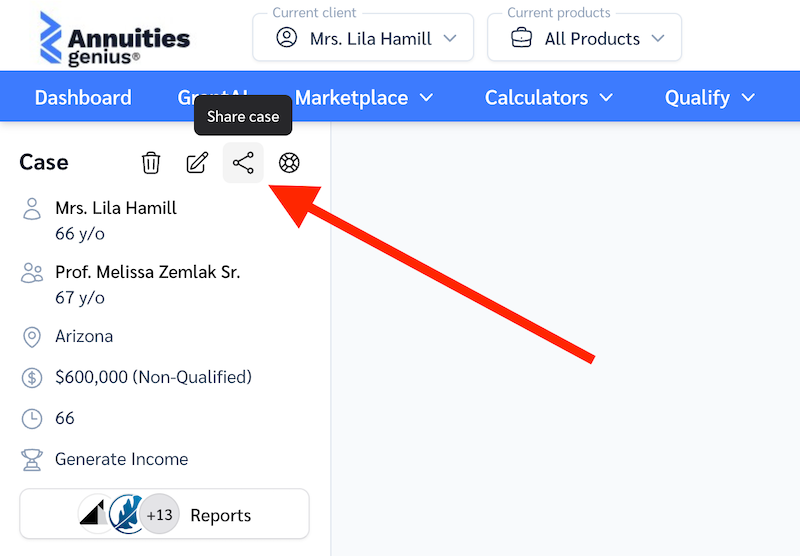
If you share with someone who isn't on Annuities Genius yet, they'll get an invite to join and pick up the case from there.
2. Case Design Queue
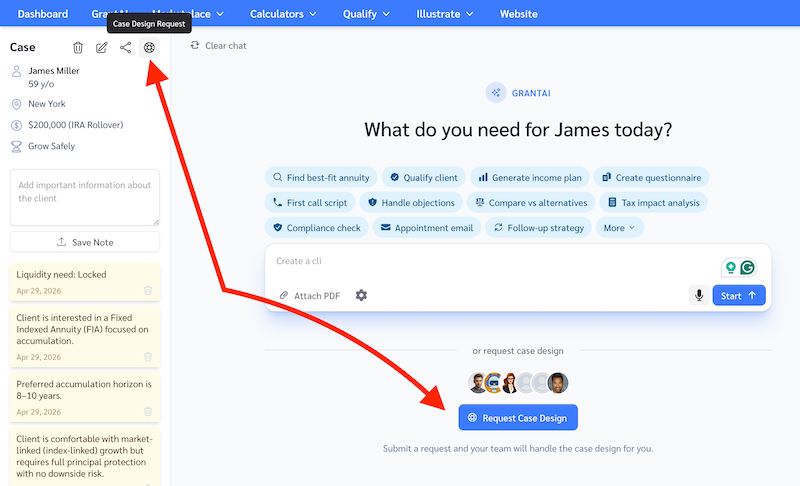
Need help building a case? Send it to your firm's Case Design team in one click — no email, no attachments, no re-entering profile data. Your structured client case is the request.
For producers
What it means for your workflow:
- Submit any client case to the Case Design Queue and get expert help building the illustration or strategy
- The team sees the full client profile instantly — same data you've entered
- Track status from your dashboard, no more "did they get my email?"
- One active request per client keeps things clean
How it works:
- Open the client case → click Request Case Design
- The request lands on the Case Design Manager's queue; they're notified by email
- Track progress from your main dashboard
- Mark complete when you're done, or cancel if priorities change
For case design managers
What it means for your workflow:
- Every request arrives with the full structured client profile already attached — no intake form, no clarifying email thread
- New requests appear on your dashboard and notify you by email
- See every unassigned request in the queue plus everything assigned to you
- Pick up work in priority order; admins can configure SLAs and aging thresholds so nothing slips
How it works:
- Email notification arrives when a producer submits a request
- Open it from your dashboard — full client context is already there
- Build out the case directly inside Annuities Genius
- The producer sees your work in real time and closes the loop when satisfied
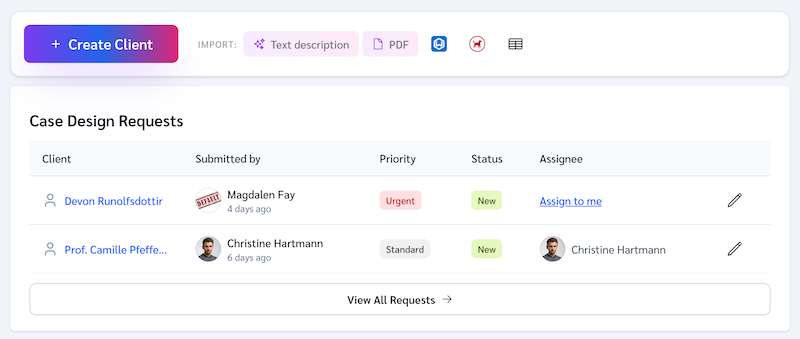
Admins see every request across the firm and can tune SLA thresholds per organization to match how your team actually operates.
Why we built this
Both features remove the same friction: bringing other people into a case without losing the structured data you've already built. Less copy-paste, fewer email threads, faster turnaround for your clients — whether your "team" is one assistant or a full case design desk.