Free course for life, health and Medicare agents

Make more money on your first appointment.

The products, the math, the proposal and the application. 16 free lessons show you every move on your own clients.

Start lesson 1 — free

Start with lesson 1: An annuity, next to what you sell.

Continue where you left off

New case

Move 1 of 7

Single woman, 66, in Texas, working until 68.

$150,000 in a traditional IRA, about $40,000 saved.

Wants income she can't outlive, starting at 68.

Prefill form
The proposal she receives
Proposal cover: A Paycheck for Life, prepared for the practice client, with income from age 68, and its page dots 1 to 11.

Her income from 68

$1,253 a month

calculator example, not a quote

Your clients are retiring with IRA, 401(k) and CD money.

Someone will help them turn it into income they can't outlive. You already have their trust.

The average case is $200,000.

One annuity case for a client you already have can pay for years of Genius.

You choose. Genius does the math.

GrantAI and the calculators compare products across 110+ carriers.

Follow one case, move by move.

The course's practice client: a woman, 66, in Texas, with $150,000 in a traditional IRA. She wants income from 68. The money comes from the two meetings the course sets up: meeting one finds her real problem and books meeting two; at meeting two you show the plan and end with a decision or a date. Here is every move from the first sentence to the application, and the lesson that teaches it.

Move 1 of 7: Three sentences

Move 1

Tell Genius about her in three sentences.

Type her the way you'd describe her to a colleague, or paste your meeting notes. Genius fills in the case: age, state, money, goal. You check each field.
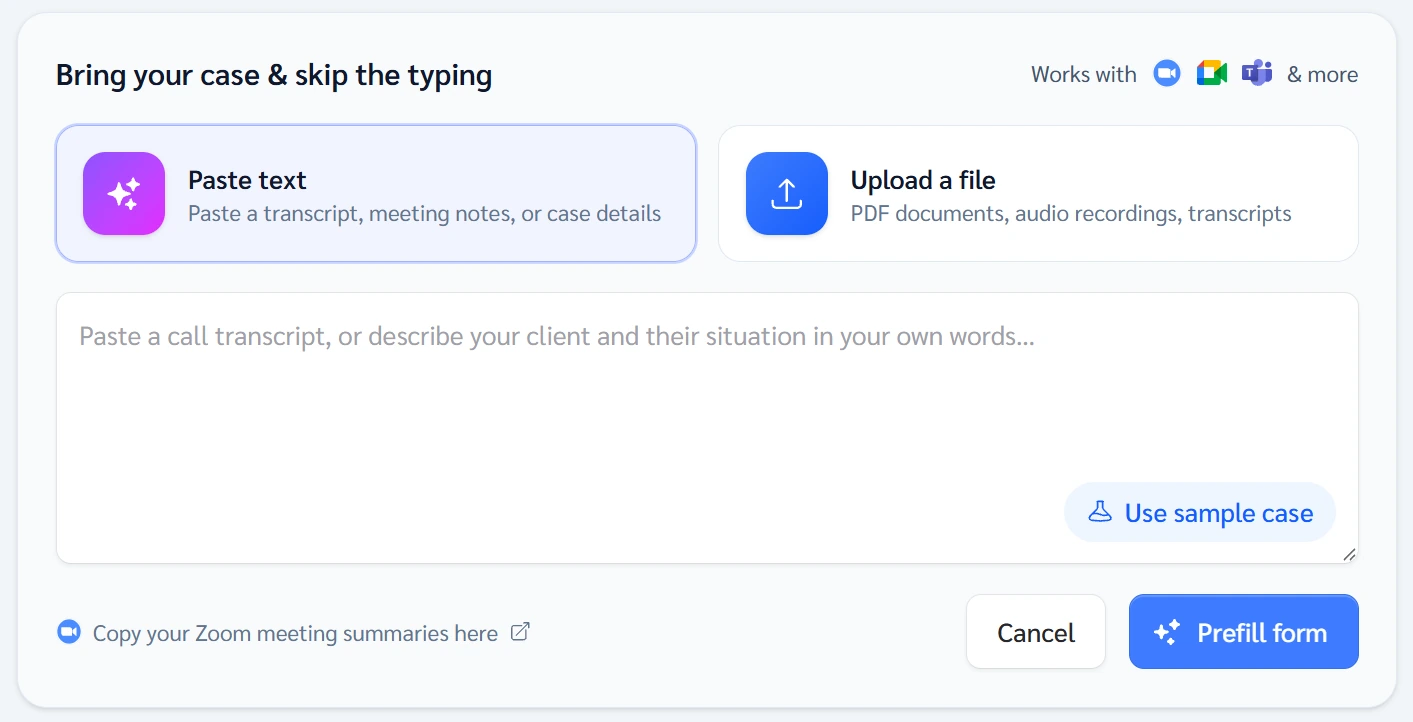
New case
Genius new case window: paste text or upload a file, then Prefill form.

Move 2

GrantAI reads the meeting and tells you what changed.

After meeting one, paste the transcript. GrantAI saves the facts to her file and flags what changes the plan: she works until 68, so the two years before income starts are not a gap to fill. You check the answer. You decide.
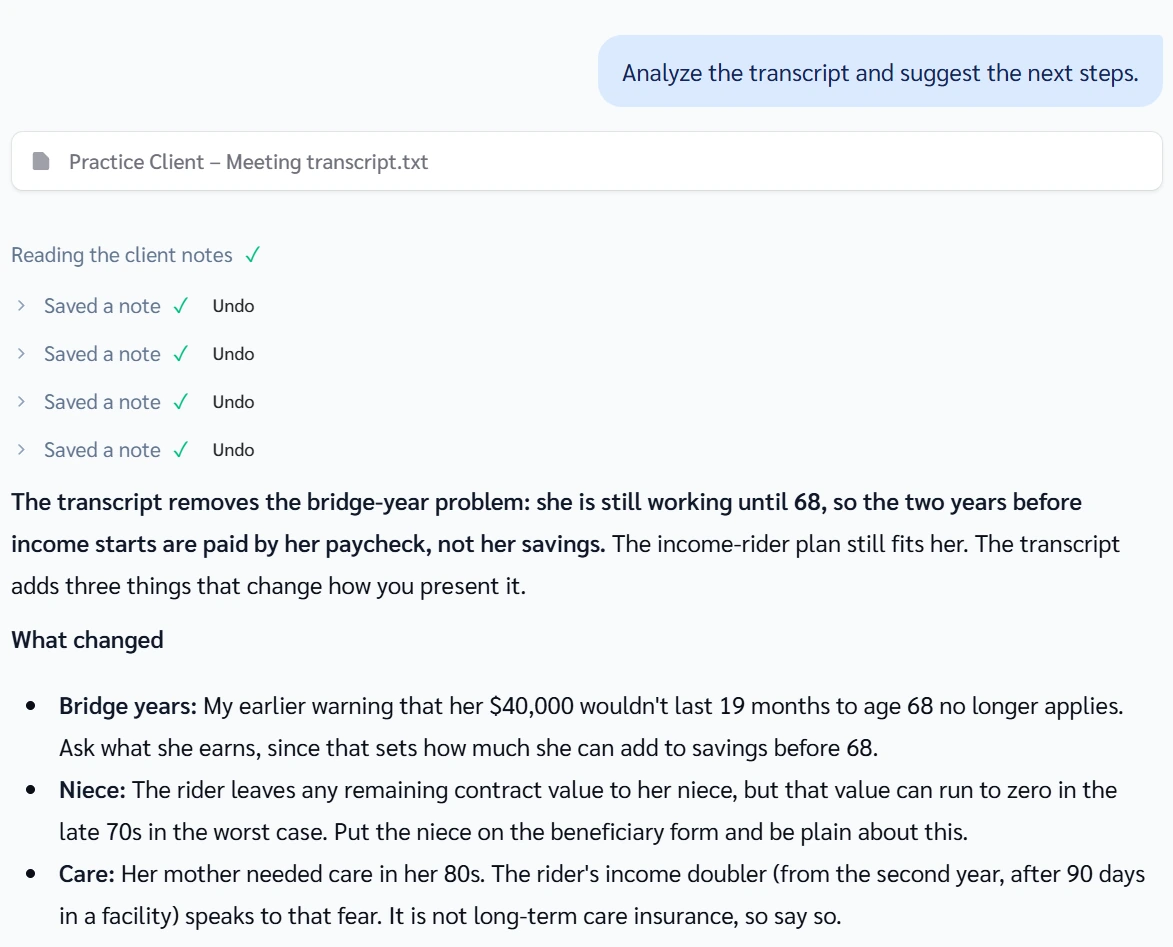
GrantAI, inside her case
GrantAI reads the meeting transcript, saves four notes and explains what changed: bridge years, the niece as beneficiary, her fear of care costs.

Move 3

Three products to show her, not three hundred.

Her goal, age, state and IRA go in. Three income options come back, with the rider fee, surrender years and free withdrawal side by side. The cards don't name the sales channel, so check it in the calculator before you pick: the first one, $15,345, is fee-based, and a commission agent skips it.
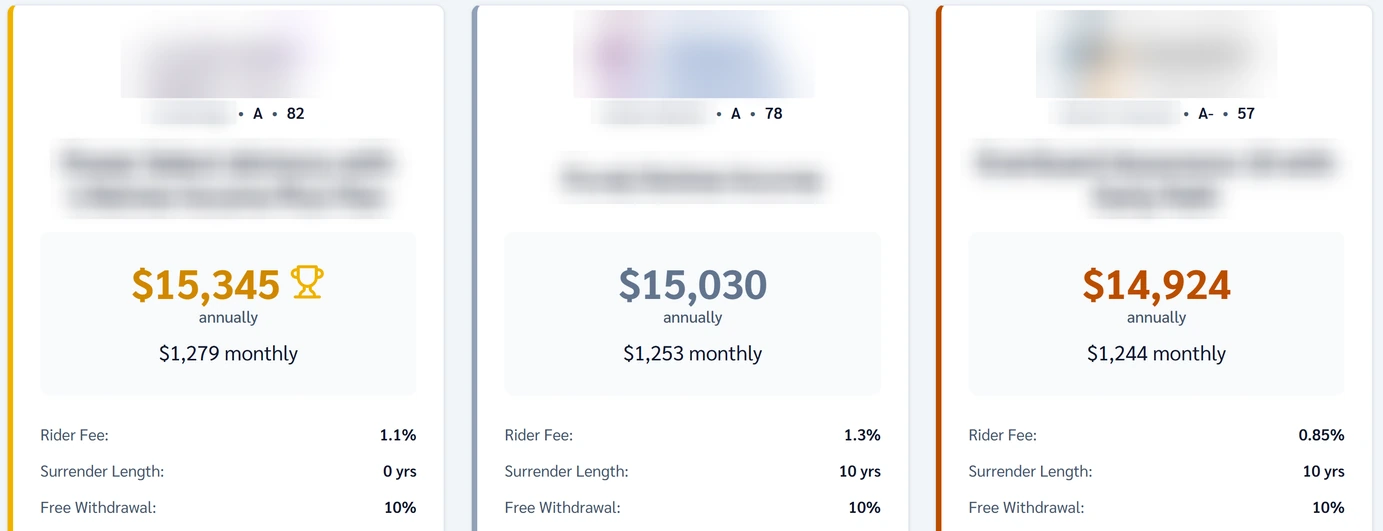
Top 3 options for the practice client
Top 3 annuity options for the practice client: $15,345, $15,030 and $14,924 a year, with rider fee, surrender length and free withdrawal.

Move 4

"How much a month?" Find the answer on one screen.

It's the question every client asks. At meeting one you say you will find out. Then set income to start at 68, switch to monthly, and every option lines up by monthly income from the calculator. Skip fee-based rows: here the top row is fee-based, so her $1,253 is the next one. Confirm the one you pick in its Genius Illustration, and in the insurer's illustration if the product has one.
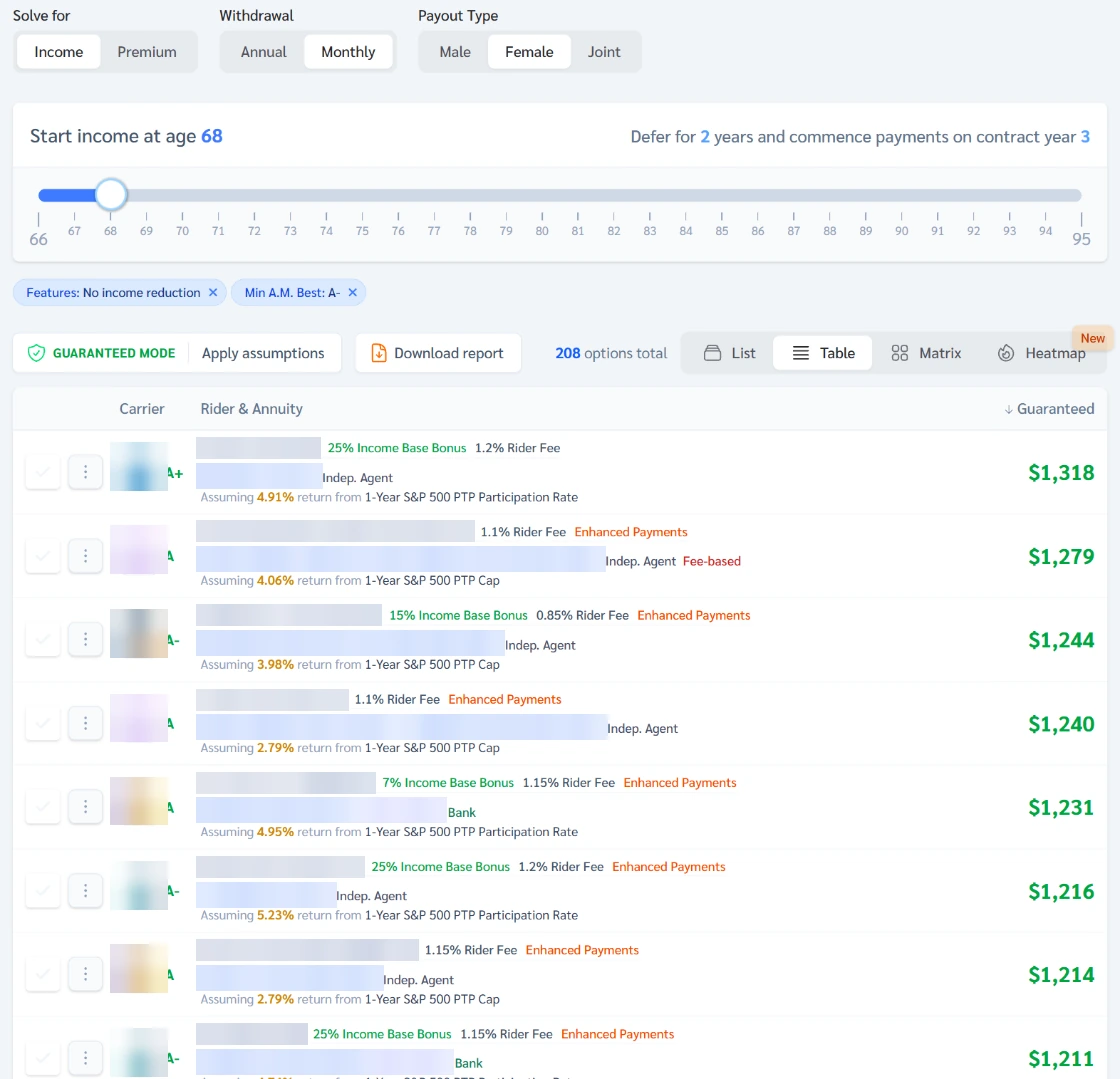
Income calculator
Income calculator, Table view: income starts at age 68, withdrawal set to Monthly, 218 options total ranked by monthly income. The top row, $1,279, is tagged Fee-based; the row under it, $1,253, is tagged Indep. Agent.

Move 5

A proposal with your name on it.

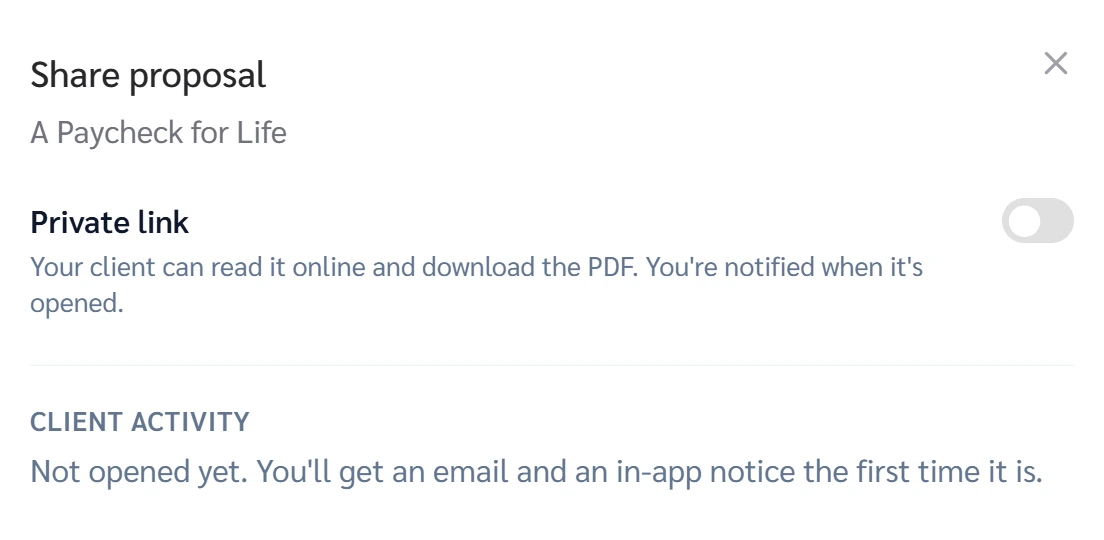
Before meeting two, Genius turns the option you pick into a proposal, "A Paycheck for Life", and you read it as she will. On commission, re-quote a fee-based pick on a row you can sell first. At the meeting you confirm her facts, then show it. If she asks for it sooner and her facts are confirmed, turn on the private link: Genius tells you when she opens it.

Her proposal
The open proposal A Paycheck for Life, 11 pages, with Edit, Preview, Share and PDF buttons.
Share proposal window: private link, the client can read it online and download the PDF, and you are notified when it is opened.

Move 6

"I can't get at my money." You already have the answer.

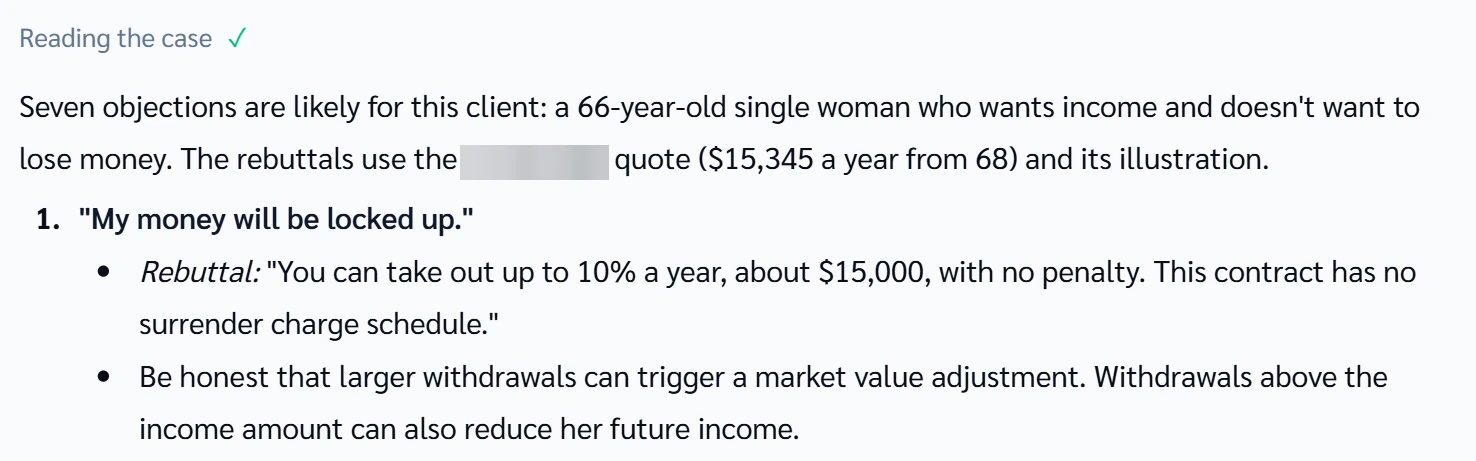
Before you show her the proposal, GrantAI drafts the objections she is likely to raise, with answers built on her own numbers. The first is how much of her money she can reach.
GrantAI: objections for this client
GrantAI's answer on objections for this client: the quote it uses, $15,030 a year from 68 on $150,000, then the first objection, I can't get at my money, with the first two points of its answer: 10% a year free, about $15,000, and about $40,000 in the bank.

Move 7

The application, prefilled from her file.

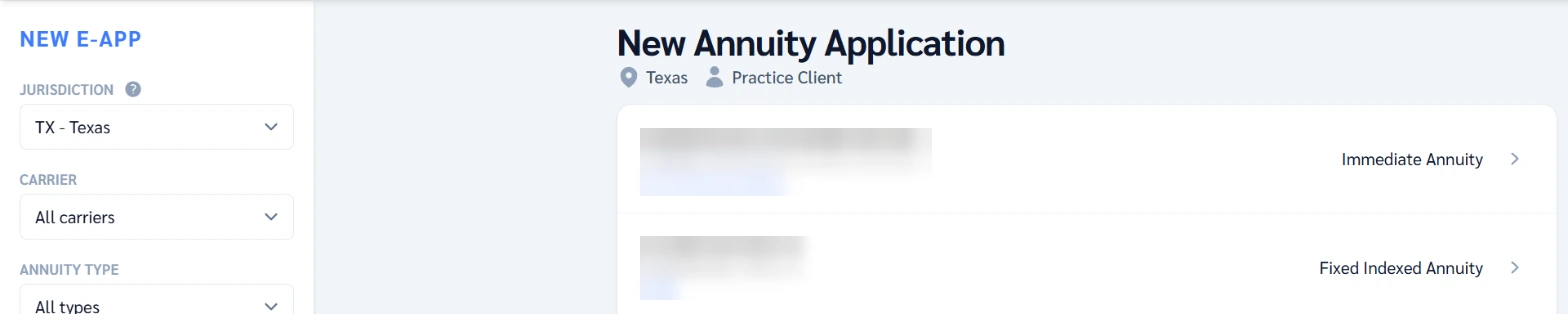
She says yes. You run the compliance check and confirm her details, then the e-application opens for her state and prefills from the client details you already entered. After the sale, the annual policy review keeps her your client.
New annuity application
New annuity application for the practice client in Texas.

That's one case. Now run the same seven moves on a client of yours.

Three short lessons come first, then your first client in Genius, then the selling. Every lesson uses real screens and your own clients.

Start lesson 1 — free

Top producers already know how to sell annuities. We help everyone else sell like one.

A client at the kitchen table asks: “How much a month?”

Before the course

“Let me find out and get back to you.”

  • You refer the 401(k) rollover to someone else and hope the client comes back.
  • You name the one product you heard about, without checking it fits.
  • The meeting ends with no homework and no date, so nothing gets booked.

After the course

“Let me run your numbers and show you at our next meeting. Which day works?”

  • You run the first meeting yourself, with every fact on one screen.
  • At meeting two you show up to three options in a proposal with your name on it. The client decides.
  • You answer the objections, end each meeting with a decision or a date, and submit the application.

Meeting one and meeting two are lesson 7.

The whole road: 16 lessons.

57 short pages, 16 quizzes and 4 practice tools inside the lessons. Free and self-paced. Every page is done in Annuities Genius, on a practice client or a real one.

A move you watched above

Start: three short lessons

  1. 1An annuity, next to what you sellStart from the cover you already sell. Say what an annuity is in one sentence, then ask the question that sets the client's goal in Genius.
  2. 2Three kinds: fixed rate, index growth, income A MYGA grows money at one fixed rate. An FIA's interest follows an index. A SPIA pays a check for life, and an income rider lets an FIA do the same. Learn which client words point to each.
  3. 3What to ask, and why it mattersEach answer changes which product can fit. Ask for the facts, turn risk into dollars, and check the fit.

Your first client in Genius

  1. 4Your first case, start to finish One evening, one client. Enter them, narrow to three in Navigator, ask GrantAI, check the rows, and read the proposal first.
  2. 5Final task: run one practice clientRun one practice client through Genius yourself, from three sentences to the proposal. Each step says what done looks like.

Selling to the clients you already have

  1. 6Open the annuity talkWho to call first, your booking page, and a short call that books the meeting. Also: which Medicare clients get a separate talk.
  2. 7Meetings one and two Meeting one finds the problem: their agenda, the facts and the next date. Meeting two shows the proposal, names the costs and ends with a decision or a date.
  3. 8Answer the objections you will hear GrantAI drafts the answers, and "I want to read up first" ends with a date. Then answer cost, your pay and your years, "let's wait" and another agent's proposal on screens in Genius. Agree first, then offer a next step.
  4. 9Apply, then keep the client Run the compliance check, then start the application and move the money. After the sale, deliver the contract and set the review. No sale yet? Plan a follow-up.
  5. 10Review the annuity they already ownCall the owner, test the contract against today's quotes and count what leaving costs. Keep it when it holds up; replace only for a clear gain.

Deeper (optional): open when a case needs it

  1. 11Read the contract: rider, exit and taxOptional: open it when a client asks about fees, leaving early or tax. Read the income rider, the exit costs and which money pays.
  2. 12Marketplace filters: what each one meansYou can skip this until a product list is too long to read. The Marketplace lists every product in your deck. Filters narrow the list. Learn what each filter asks, then check that a product takes your client.
  3. 13Which Genius tool fits which goalLeave it for later unless the goal is money for family or care costs. Each worry the client names has its tool: see the map, then the legacy calculator and the care rider.
  4. 14Compare income the right way Not needed for a first case: come back when a client weighs several income offers. Answer "how much a month?" with every option on one screen. Then check the start age, the fee and the gap. The highest income is not always the best fit.
  5. 15Read an illustration, and whose it isOptional for now: come back when a client asks for the full table. An illustration is a table of values, year by year. Learn its columns, how the Genius view differs from the carrier's own, and why averages mislead.
  6. 16GrantAI: ask well, then check Skip this until you want more from GrantAI than your first case needed. Attach the client's papers, use the starters, set your instructions once, and know where app questions go.

What agents tell us about selling with Genius.

“It's got my name on it… it makes me look professional.”

“It closes deals for me. No doubt about that.”

“Instead of me spending an hour and a half… juggle the numbers.”

“Even if I have one client a month that would pay off.”

Licensed agents, in their own words, from our customer interviews.

carriers
110+
agents on the platform
15K+
IMOs
200+
average premium per case
$200k
Type II security audit
SOC 2

Pick one client you already serve.

Start with three short lessons, then take them from three sentences to a draft proposal you read first.

Start lesson 1 — free

16 lessons, self-paced.