
Lesson 4 of 16 · Page 2 of 5
Name the job, then narrow to three
Name one job for the client's money, then let Navigator narrow the list to three products. You choose, not the app.
Do it in Genius
All cases your client Navigator Lifetime Income Top 3 Annuity Options
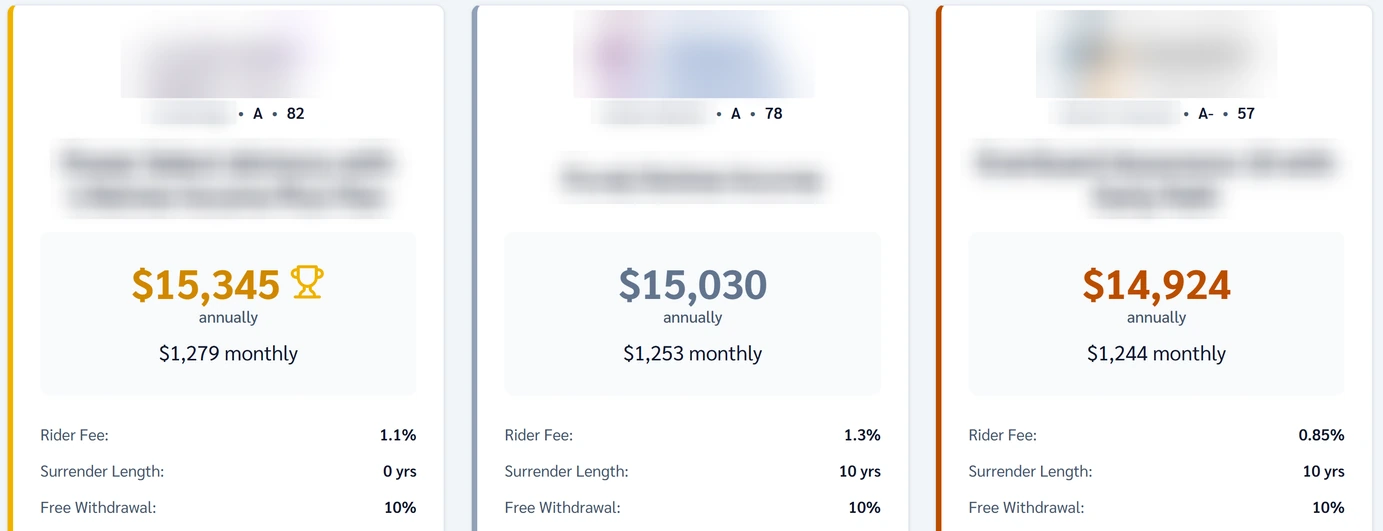
Practice Client, 3 Nov 2026: Navigator narrows 1401 annuities to three cards. On 12 Nov they paid $15,345, $15,030 and $14,924. Cards show no channel.
Rates change every day, so yours will differ.
Open your clients in Genius (opens the app in a new tab)In the app: CRM → All cases
 (opens full size in a new tab)
-
1.
Take two answers from What to ask: what comes first, and the money's job. Income? Open Navigator in the left card, then Lifetime Income.
Growth comes first? That is the other door, Growth & Accumulation. This course walks the income door.
See also:
-
2.
Answer each step. Practice Client: With access to funds, Move money one time, Single female, start at 68, Level income, rating A-.
Annuity products left, on the left, counts what is still in play: 207 after the income door on 3 Nov.
-
3.
Read the three cards like three plans you lay side by side for a client. Each has the same three rows.
- Rider Fee
- Usually a yearly charge for the lifetime income. The contract says what the percent is taken from.
- Surrender Length
- How many years the money is tied up. Taking out more than the free amount before then costs a charge.
- Free Withdrawal
- The share the client can take out each year with no surrender charge.
The $15,345 card's calculator row says Fee-based: on commission, skip it. $14,924 had the lowest fee, 0.85%.
-
4.
On saved results, above the cards sit Restart, Explore More Options, Download PDF and Create Proposal. Each card has Illustrate.
Our saved run had no table under the cards. Next, ask GrantAI for the pick you can sell.