
Lesson 16 of 16 · Page 1 of 3
Give GrantAI the client's papers, then steer it
The lesson Your first case sent one task. Now give GrantAI the client's papers, use the starters for each stage, and save how you work.
Do it in Genius
All cases your client GrantAI Ask GrantAI paperclip
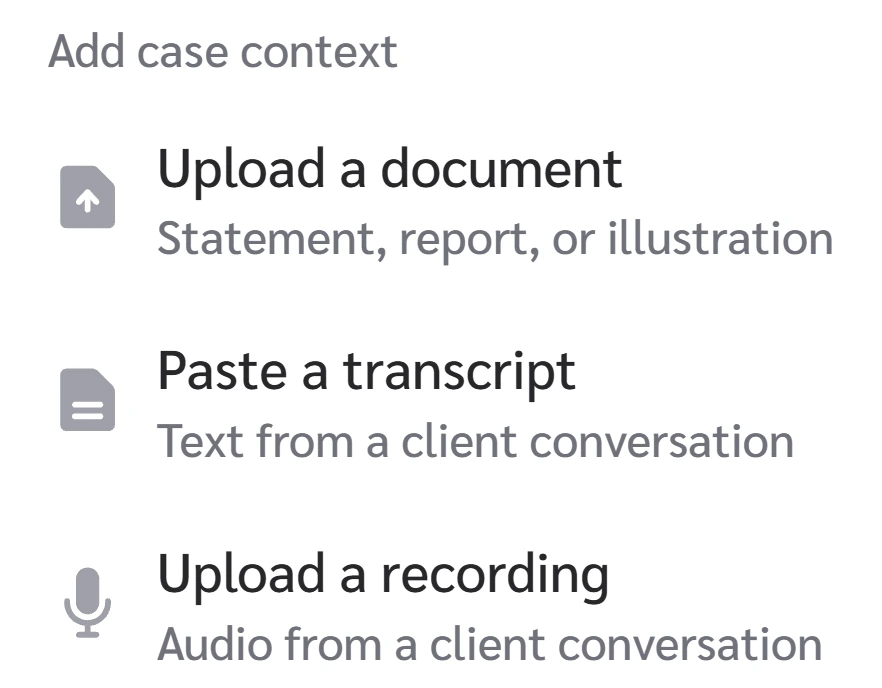
Practice Client, 10 Nov 2026: the paperclip opens Upload a document, Paste a transcript and Upload a recording.
Open All cases in Genius (opens the app in a new tab)In the app: CRM → All cases
 (opens full size in a new tab)
-
1.
Use the paperclip. Upload a document takes a statement or a proposal. Paste a transcript or Upload a recording takes a meeting.
The links below show a transcript, a proposal and a statement in use. Documents go in as PDF files.
-
2.
Starter chips change with the stage. At Discovery: Compare FIA carriers and caps, Compare MYGA vs FIA growth, Draft client follow-up email.
At Proposal they change with each answer, such as Run stress test. Typing "/" or "@" opens nothing.
-
3.
Save how you work: the gear in the box, Settings, GrantAI, Custom Instructions. It takes up to 5,000 characters.
I sell annuities on commission. Show only products I can sell on commission, without Advisory or Fee-based products.
Select the text and copy it.
Still write your commission limit into each task, as the lesson Your first case shows. A Fee-based row? Ask again without it.
-
4.
Check each answer as in Your first case. The panel's … menu also holds AI Judge: try it on the Practice Client first.
Under the box GrantAI says it "can make mistakes. Check important info."