
Lesson 11 of 14 · Part 4 of 5
When there is no sale yet: the Follow-up schedule
Use the Follow-up schedule to plan the next emails and calls when there is no sale yet.
Do it in Genius
All cases your client GrantAI More Follow-up schedule
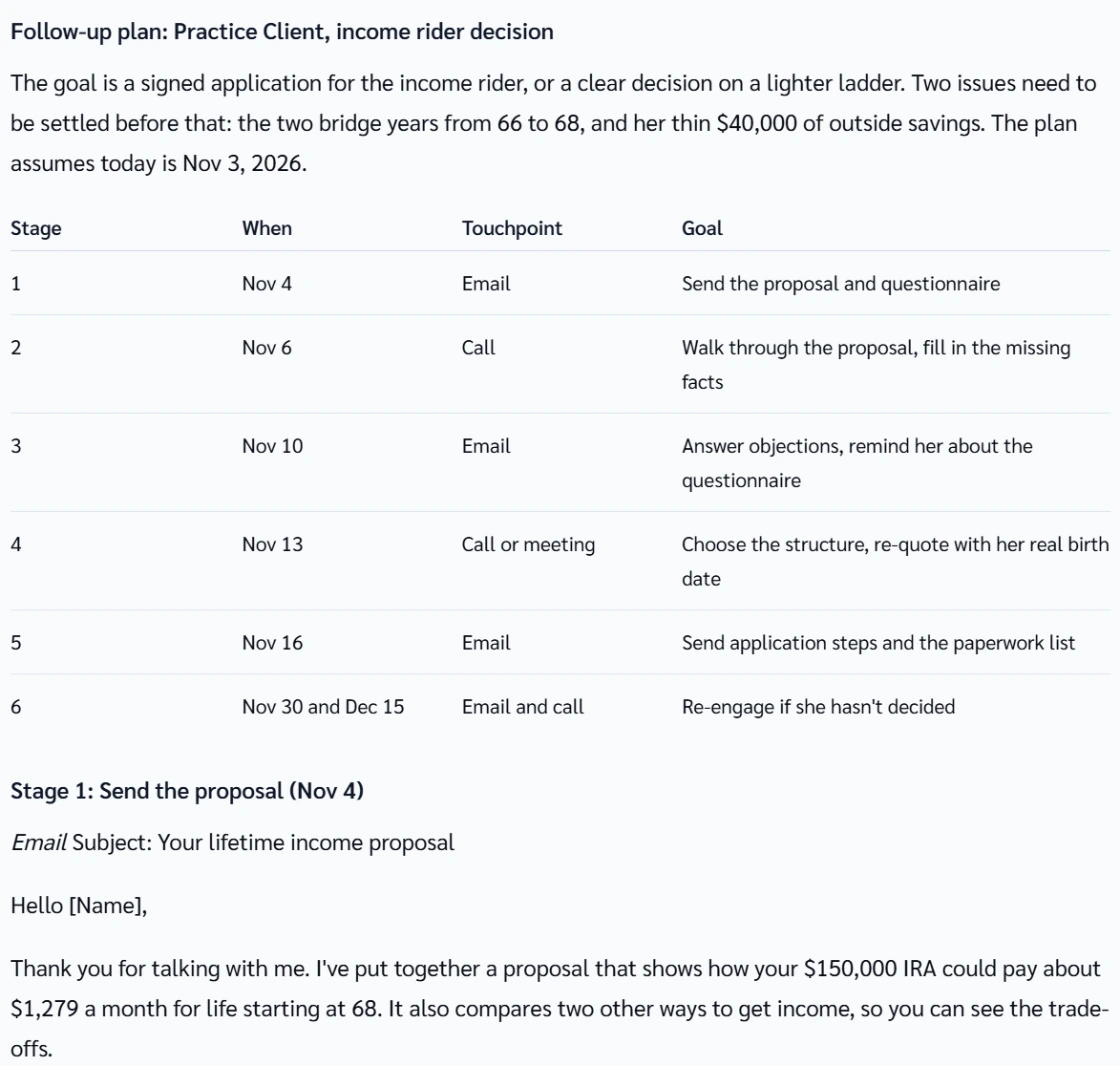
Practice Client, 3 Nov 2026: Follow-up schedule writes a six-step plan of emails and calls. It runs from 4 Nov to 15 Dec.
Open your clients in Genius (opens the app in a new tab)In the app: CRM → All cases
 (opens full size in a new tab)
-
1.
Click More, then Follow-up schedule. GrantAI writes a plan of emails and calls.
Each stage has a draft email or call script. A draft may quote a Fee-based product: on commission, use your own numbers.
-
2.
Copy the dates into your own calendar, then send each email and make each call yourself.
The plan creates no tasks or reminders in Genius.
-
3.
Send what you promised first. Stage 1 of the example plan is an email with the proposal and the questionnaire.
-
4.
Stalled? Offer a smaller first piece. GrantAI may suggest Test lighter ladder. A clear no goes in Save Note. Stop the plan.
Same questions again and again? Ask what is missing, answer it, then ask for a decision date.