
Part 2 of 2
Set up Claude
Connect it once, check it for free, then pick the model for a whole client case.
-
1.
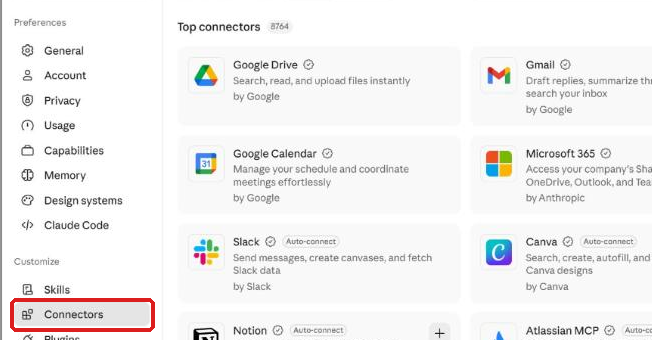
Open Settings. Under Customize, click Connectors.
 (opens full size in a new tab)
-
2.
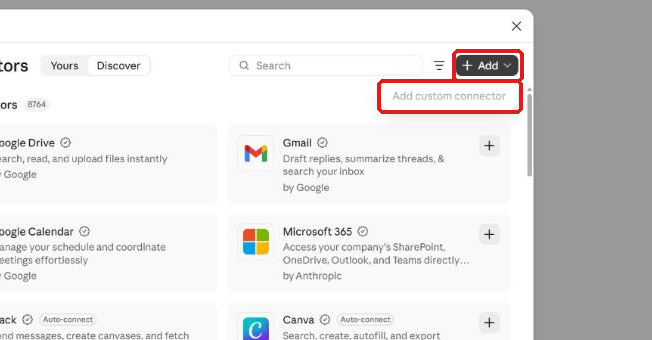
Click + Add, then Add custom connector. Name it Annuities Genius, paste this address and click Continue.
https://app.annuitiesgenius.com/mcp Select the text and copy it.
A window then shows the sign-in settings Claude found. Click Continue there, then Add.
 (opens full size in a new tab)
-
3.
If Claude asks you to sign in, use your Annuities Genius login.
-
4.
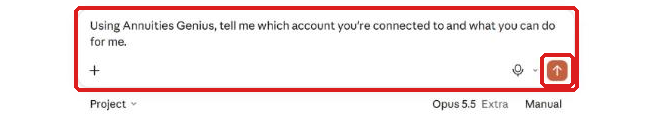
Check it for free. Open a new chat, paste this question and send it.
Using Annuities Genius, tell me which account you're connected to and what you can do for me.
Select the text and copy it.
Claude names your account. Looking up your own data is free.
 (opens full size in a new tab)
-
5.
In a team organization, Claude asks before each call. Click Allow once.
Read-only requests, such as your credit balance, also offer Always allow. Quotes and illustrations do not.
-
6.
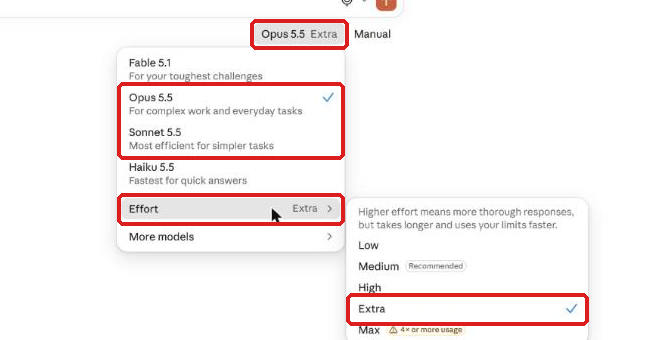
For a whole client case, click the model name under the message box. Pick Sonnet or Opus, then set Effort to Extra.
The name now ends in Extra. Haiku suits quick questions, not a whole case.
 (opens full size in a new tab)