
Lesson 5 of 14 · Part 1 of 10
Run every option
One screen shows the lifetime income every carrier in your deck pays for your client's money. It also shows each carrier's sales channel.
Do it in Genius
Income rider calculator Solve for Payout Type Rider features
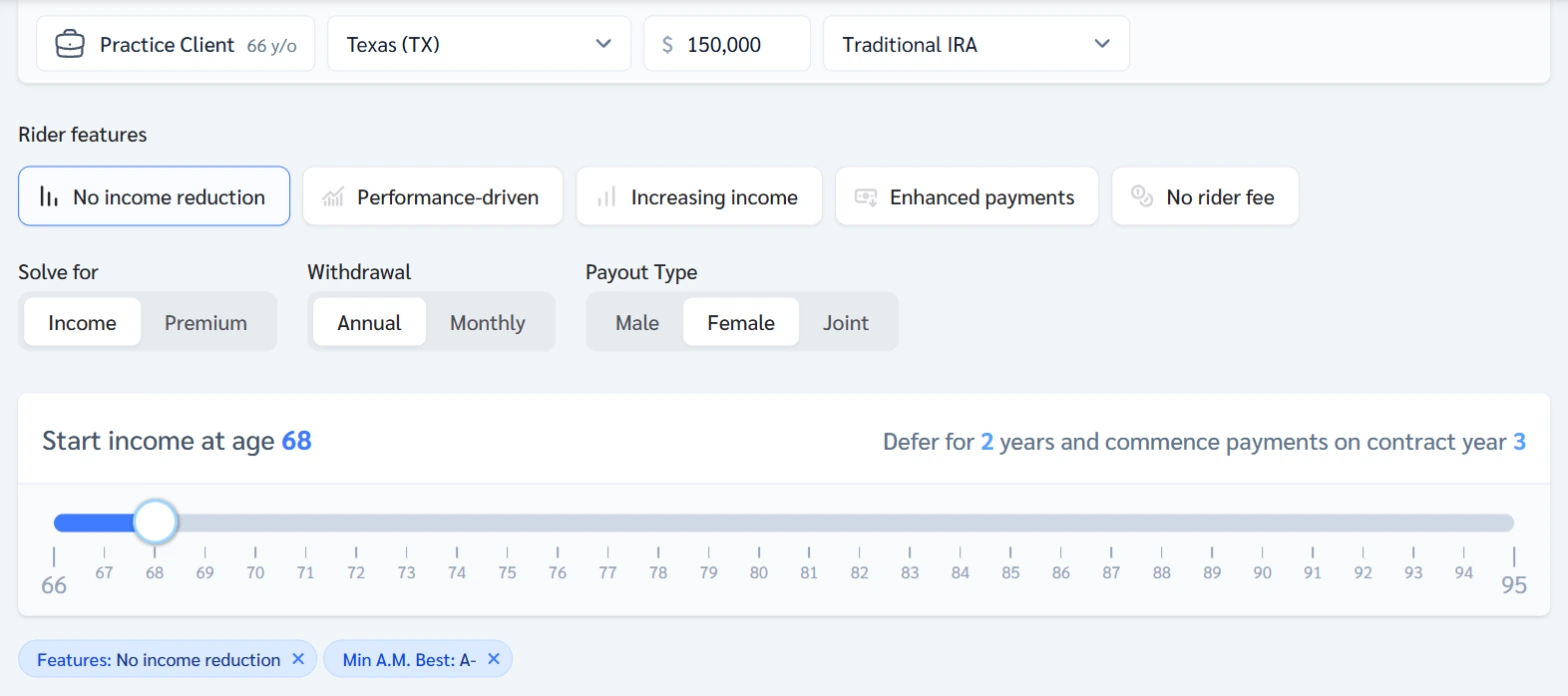
Practice Client, 3 Nov 2026: with No income reduction on, the first row pays $15,810 a year. That is $1,318 a month.
Rates change every day, so yours will differ.
Open Income rider calculator in Genius (opens the app in a new tab)In the app: Calculators → Income rider calculator
 (opens full size in a new tab)
-
1.
Pick the client in Current client at the top. Open Calculators, then Income rider calculator.
It opens filled in: Practice Client, 66, Texas, $150,000 IRA.
-
2.
Set Solve for to Income, Payout Type to match the client, and drag Start income at age to 68.
It reads: Defer for 2 years and commence payments on contract year 3.
-
3.
Click No income reduction under Rider features, unless it is already on.
It can stay on from your last visit. Off, the top row is $17,730 but falls to $14,400 from 73.
-
4.
Read the rows. Skip Income Can Decrease, Fee-based and channels you can't sell. Write down the first three that remain.
Practice Client: $15,810 (Indep. Agent) is first. The $15,345 row says Fee-based: sold by registered investment advisers, so a commission agent skips it.