
Lesson 5 of 14 · Part 5 of 10
Single, joint and when to start
Two choices move the paycheck most: whose life it covers, and how long the client waits. Genius shows both on one screen.
Do it in Genius
Income rider calculator Payout Type Start income at age Matrix Generate Matrix
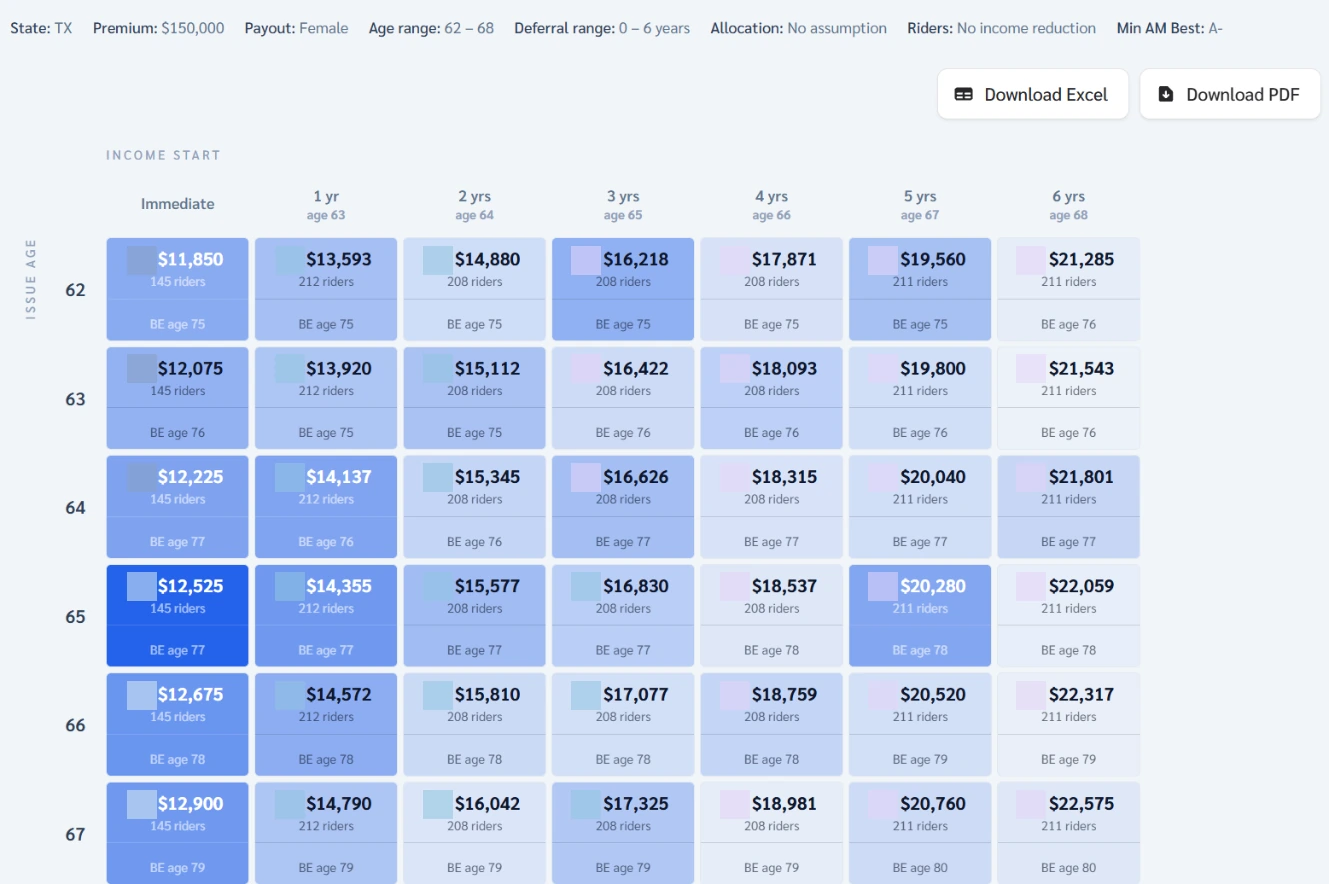
Practice Client, 3 Nov 2026: Matrix for age 66 shows $12,675 now, $15,810 after 2 years, $22,317 after 6. Amounts are yearly.
Rates change every day, so yours will differ.
Open Income rider calculator in Genius (opens the app in a new tab)In the app: Calculators → Income rider calculator
 (opens full size in a new tab)
-
1.
Set Payout Type to Joint and compare the same row. Joint income starts lower: it covers two lives.
Joint quotes need Spouse or Joint Owner on the client's form.
-
2.
Click Matrix. Set Min Age and Max Age to include 66, then click Generate Matrix. Read row 66.
Default is 55 to 65. It takes about three minutes. Cells show a breakeven age (BE).
-
3.
Open Heatmap. Find the same rider at age 68 and compare it with Table.
Heatmap says $1,214 a month, Table $1,318. $1,214 a month matches Genius Illustration's $14,573 a year at 68.
-
4.
Weigh it out loud: how many years of the higher income make up for the years without income?