
Lesson 4 of 14 · Part 3 of 4
Check the product will take this client
Open Purchase and Variations before you show numbers. A product that cannot take your client wastes the meeting.
Do it in Genius
Income rider calculator row ⋮ Annuity info Purchase
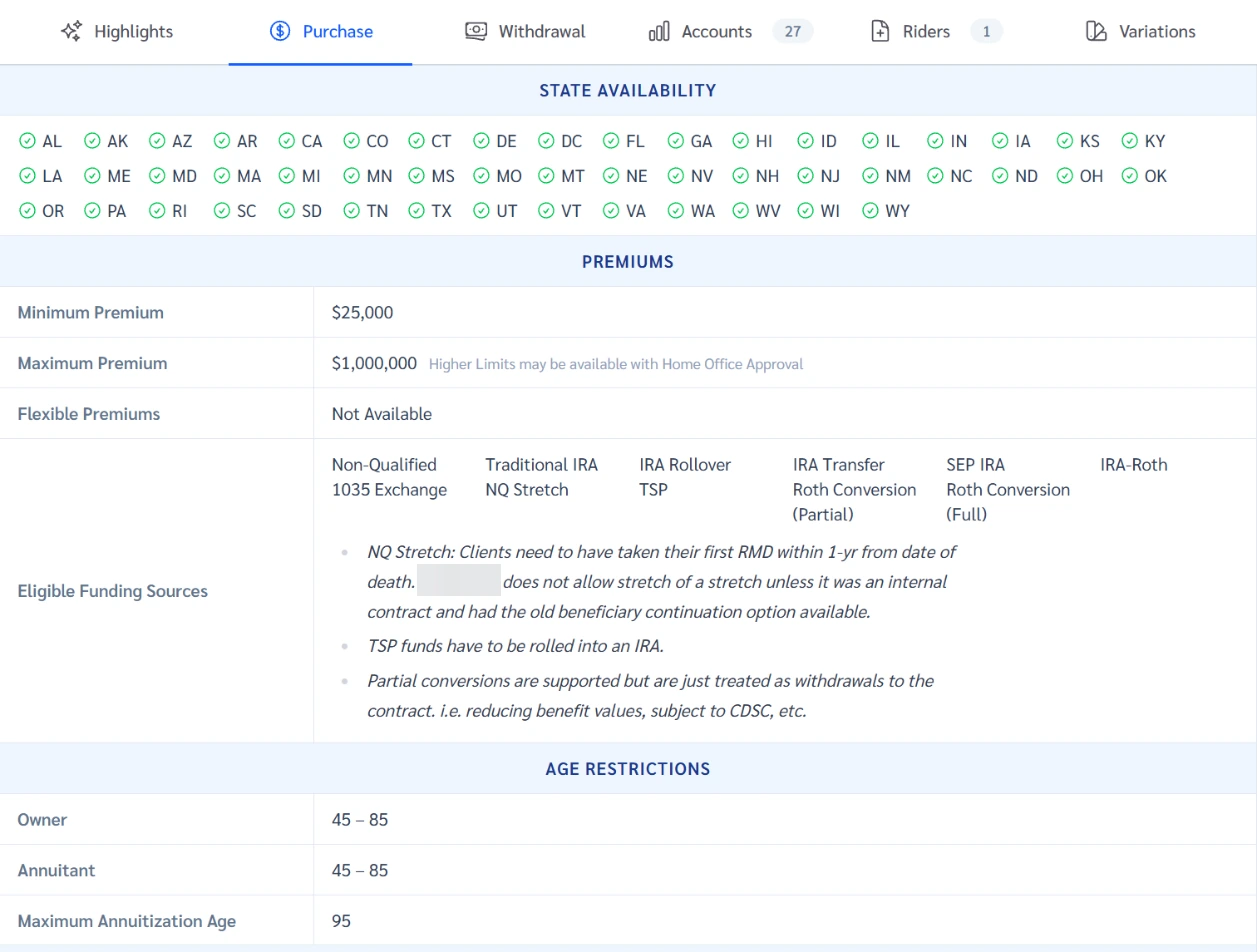
Practice Client, 3 Nov 2026: Purchase lists states, premium from $25,000 to $1,000,000 and owner ages 45 to 85. Texas is ticked.
Rates change every day, so yours will differ.
Open Income rider calculator in Genius (opens the app in a new tab)In the app: Calculators → Income rider calculator
 (opens full size in a new tab)
-
1.
Click the three dots, Annuity info, Purchase. Check your client's state in State availability. Then the premium limits, the ages and the money sources.
Practice Client fits: Texas is ticked, 66 is in 45-85, $150,000 is in range, Traditional IRA is listed.
-
2.
Open Variations and read the line for your client's state. The surrender scale can differ by state.
Texas has no line of its own here, so Most States applies: 10% down to 1%. California: 9% down to 0.8%.
 (opens full size in a new tab)